Notice. New forum software under development. It's going to miss a few functions and look a bit ugly for a while, but I'm working on it full time now as the old forum was too unstable. Couple days, all good. If you notice any issues, please contact me.
JanVolk Guru Joined: 28/01/2023 Location: NetherlandsPosts: 420
Posted: 10:33am 03 Jun 2026
Copy link to clipboard
Print this post
Peter,
Updated the PicoMite MMBasic RP2040 V6.03.00RC15 test firmware and copying the long file from A to B with FM first marked with * and then F5 works perfectly now. Thanks.
Jan.
WhiteWizzard Guru Joined: 05/04/2013 Location: United KingdomPosts: 2994
Posted: 10:45am 03 Jun 2026
Copy link to clipboard
Print this post
Has anyone been able to get USB touch working that connects to the Pico via HDMI (for the video) but with a screen that also accepts video via the same USB C that touch is on??
Peter - with your thorough knowledge, is the above a non starter for screens that use the USB for video and touch? I.e. does the usb need to be dedicated to touch data only? Edited 2026-06-03 20:46 by WhiteWizzard
JanVolk Guru Joined: 28/01/2023 Location: NetherlandsPosts: 420
Posted: 12:08pm 03 Jun 2026
Copy link to clipboard
Print this post
Has anyone seen this before? I have no video signal. Perhaps the OPTION VGA PINS aren't working correctly? I also no longer see the option resolution 640x480 @ 252000 KHz. It did work with an older version. Or is there something wrong with my hardware?
PicoMiteVGA MMBasic USB RP2040 Edition V6.03.00RC15 Copyright 2011-2026 Geoff Graham Copyright 2016-2026 Peter Mather
> US USB Keyboard Connected on channel 1 > USB Mouse Connected on channel 2
> option list PicoMiteVGA MMBasic USB RP2040 Edition V6.03.00RC15 OPTION SERIAL CONSOLE COM2,GP8,GP9 OPTION SYSTEM I2C GP16,GP17 OPTION FLASH SIZE 16777216 OPTION COLOR CODE ON OPTION KEYBOARD US OPTION HEARTBEAT OFF OPTION PICO OFF OPTION SDCARD GP21, GP18, GP19, GP20 OPTION VGA PINS GP11,GP22 OPTION AUDIO I2S GP13,GP15', ON PWM CHANNEL 6 OPTION RTC AUTO ENABLE OPTION F1 help OPTION F5 list commands OPTION F6 list functions OPTION F7 list pins OPTION F8 option list OPTION F9 fm OPTION PLATFORM PicoMiteVGAUSB RP2040-PiZero
See this version for video signal.
> option list PicoMiteVGA MMBasic USB RP2040 Edition V6.03.00RC9 OPTION SERIAL CONSOLE COM2,GP8,GP9 OPTION SYSTEM I2C GP16,GP17 OPTION FLASH SIZE 16777216 OPTION COLOURCODE ON OPTION KEYBOARD US OPTION HEARTBEAT OFF OPTION PICO OFF OPTION RESOLUTION 640x480 @ 252000KHz OPTION SDCARD GP21, GP18, GP19, GP20 OPTION VGA PINS GP11,GP22 OPTION AUDIO I2S GP13,GP15', ON PWM CHANNEL 6 OPTION RTC AUTO ENABLE OPTION F1 help OPTION F5 list commands OPTION F6 list functions OPTION F7 list pins OPTION F8 option list OPTION F9 fm
> list pins GP0 1 OFF GP1 2 OFF GP2 4 OFF GP3 5 OFF GP4 6 OFF GP5 7 OFF GP6 9 OFF GP7 10 OFF GP8 11 Boot Reserved : CONSOLE TX GP9 12 Boot Reserved : CONSOLE RX GP10 14 OFF GP11 15 Boot Reserved : VGA HSYNC GP12 16 Boot Reserved : VGA VSYNC GP13 17 Boot Reserved : I2S BCLK GP14 19 Boot Reserved : I2S LRCK GP15 20 Boot Reserved : I2S DATA GP16 21 Boot Reserved : SYSTEM I2C SDA GP17 22 Boot Reserved : SYSTEM I2C SCL GP18 24 Boot Reserved : SPI SYSTEM CLK GP19 25 Boot Reserved : SPI SYSTEM MOSI GP20 26 Boot Reserved : SPI SYSTEM MISO GP21 27 Boot Reserved : SD CS GP22 29 Boot Reserved : VGA BLUE GP23 41 Boot Reserved : VGA GREEN L GP24 42 Boot Reserved : VGA GREEN H GP25 43 Boot Reserved : VGA RED GP26 31 OFF GP27 32 OFF GP28 34 OFF GP29 44 OFF
Jan.
matherp Guru Joined: 11/12/2012 Location: United KingdomPosts: 12040
Posted: 01:09pm 03 Jun 2026
Copy link to clipboard
Print this post
This working perfectly for me
PicoMiteVGA MMBasic USB RP2040 Edition V6.03.00RC15 OPTION SERIAL CONSOLE COM2,GP8,GP9 OPTION SYSTEM I2C GP14,GP15 OPTION FLASH SIZE 16777216 OPTION COLOURCODE ON OPTION KEYBOARD US OPTION PICO OFF OPTION RESOLUTION 640x480 @ 252000KHz OPTION SDCARD GP13, GP10, GP11, GP12 OPTION VGA PINS GP23,GP18 OPTION AUDIO GP16,GP17', ON PWM CHANNEL 0 OPTION RTC AUTO ENABLE > list pins GP0 1 OFF GP1 2 OFF GP2 4 OFF GP3 5 OFF GP4 6 OFF GP5 7 OFF GP6 9 OFF GP7 10 OFF GP8 11 Boot Reserved : CONSOLE TX GP9 12 Boot Reserved : CONSOLE RX GP10 14 Boot Reserved : SPI SYSTEM CLK GP11 15 Boot Reserved : SPI SYSTEM MOSI GP12 16 Boot Reserved : SPI SYSTEM MISO GP13 17 Boot Reserved : SD CS GP14 19 Boot Reserved : SYSTEM I2C SDA GP15 20 Boot Reserved : SYSTEM I2C SCL GP16 21 Boot Reserved : AUDIO L GP17 22 Boot Reserved : AUDIO R GP18 24 Boot Reserved : VGA BLUE GP19 25 Boot Reserved : VGA GREEN L GP20 26 Boot Reserved : VGA GREEN H GP21 27 Boot Reserved : VGA RED GP22 29 OFF GP23 41 Boot Reserved : VGA HSYNC GP24 42 Boot Reserved : VGA VSYNC GP25 43 HEARTBEAT GP26 31 OFF GP27 32 OFF GP28 34 OFF GP29 44 OFF
JanVolk Guru Joined: 28/01/2023 Location: NetherlandsPosts: 420
Posted: 01:56pm 03 Jun 2026
Copy link to clipboard
Print this post
Peter,
Thanks for investigating and the response.
I am going to investigate further why it works correctly with PicoMiteVGA MMBasic USB RP2040 Edition V6.03.00RC9 but not with V6.03.00RC15, and how it is with the intermediate versions. If I find anything, I will let you know.
Jan.
homa Guru Joined: 05/11/2021 Location: GermanyPosts: 718
Posted: 04:24pm 03 Jun 2026
Copy link to clipboard
Print this post
Hi Peter, is there any update on the multi-touch issue with the MageDok display? Is there anything I can do to help?
Matthias
matherp Guru Joined: 11/12/2012 Location: United KingdomPosts: 12040
Posted: 04:30pm 03 Jun 2026
Copy link to clipboard
Print this post
If you can find it please re-post the diagnostic from that screen and post a link to any details. Edited 2026-06-04 02:31 by matherp
homa Guru Joined: 05/11/2021 Location: GermanyPosts: 718
matherp Guru Joined: 11/12/2012 Location: United KingdomPosts: 12040
Posted: 05:20pm 03 Jun 2026
Copy link to clipboard
Print this post
Does that report include definitely trying two fingers at the same time? If not please run again with the version that had the diagnostics and specifically try touching in two places at once. This is needed to see if the required report is actually happening. That controller boots up in "mouse" mode. i.e. single touch and simple reports but I need to know if the multi-touch reports are also happening.
JanVolk Guru Joined: 28/01/2023 Location: NetherlandsPosts: 420
Posted: 05:40pm 03 Jun 2026
Copy link to clipboard
Print this post
Peter,
I reloaded PicoMiteVGA MMBasic USB RP2040 Edition V6.03.00RC15 and performed OPTION RESET. Also > Drive "A:/FORMAT" and then copied options line by line from Notepad++ to Tera Term in a specific order. After that, I transferred the backup folder using FM. I made some adjustments to the options list. PiZero module with a 64x29mm perforated board underneath containing RTC+EEPROM, VGA connector and resistors, and an I2S module with 3mm spacer sockets. All pins are accessible and the unused HDMI pins have been used for VGA. The whole assembly is 35mm high and compact. A speaker set from Action (12 Euros) makes it complete. The bottom was finished with a similar perforated board. On the PiZero, I adjusted the debug pins for Rx=GP9 and Tx=GP8. Everything is working properly so far.
Thanks for the support. This is my options list:
> option list PicoMiteVGA MMBasic USB RP2040 Edition V6.03.00RC15 OPTION SERIAL CONSOLE COM2,GP8,GP9 OPTION SYSTEM I2C GP16,GP17 OPTION FLASH SIZE 16777216 OPTION COLOURCODE ON OPTION KEYBOARD US OPTION HEARTBEAT OFF OPTION PICO OFF OPTION RESOLUTION 640x480 @ 315000KHz OPTION SDCARD GP21, GP18, GP19, GP20 OPTION VGA PINS GP11,GP22 OPTION AUDIO I2S GP13,GP15', ON PWM CHANNEL 6 OPTION RTC AUTO ENABLE OPTION MODBUFF ENABLE OPTION F1 help OPTION F5 list commands OPTION F6 list functions OPTION F7 list pins OPTION F8 option list OPTION F9 fm OPTION PLATFORM PicoMiteVGAUSB RP2040-PiZero
Jan.
matherp Guru Joined: 11/12/2012 Location: United KingdomPosts: 12040
Posted: 05:52pm 03 Jun 2026
Copy link to clipboard
Print this post
Homa
Another question. Have you run the display on a windows machine. Can you confirm if multi-touch works on any other host?
WhiteWizzard Guru Joined: 05/04/2013 Location: United KingdomPosts: 2994
Posted: 06:53pm 03 Jun 2026
Copy link to clipboard
Print this post
Hi Peter,
I've cheekily taken the opportunity to attach a 'HID report descriptor' file for an OLED screen. This is with the hope that you can help get the USB multi-touch to work on it.
As you'd requested in earlier posts for some other screens, I'm hoping there's enough info in there, but if needed, I can run any other tests required.
Thanks for any help you can provide.....
EDIT: I can confirm it works 100% when connected to a Win 11 laptop (via HDMI for image, and via a single USB for touch & power Edited 2026-06-04 04:56 by WhiteWizzard
grumpyoldgeek Regular Member Joined: 30/07/2018 Location: United StatesPosts: 58
Posted: 07:28pm 03 Jun 2026
Copy link to clipboard
Print this post
What is the maximum size of FLASH and PSRAM supported by the current release?
homa Guru Joined: 05/11/2021 Location: GermanyPosts: 718
Posted: 08:35pm 03 Jun 2026
Copy link to clipboard
Print this post
Yes, win11 oout of the box, multitouch and gesture control also works with two-finger zooming!
The old Records also mentioned 3-finger touch. I was out and about. Tomorrow I’ll finish up several test runs with descriptions and upload them here for you.
matherp Guru Joined: 11/12/2012 Location: United KingdomPosts: 12040
Posted: 09:48pm 03 Jun 2026
Copy link to clipboard
Print this post
homa and WhiteWizard please test the attached HDMIUSB version and report exactly what you see
ville56 Guru Joined: 08/06/2022 Location: AustriaPosts: 642
Posted: 05:30am 04 Jun 2026
Copy link to clipboard
Print this post
@Peter,
minor issue: the BACKLIGHT command in the HDMI version is still not an "no-op" command as announced but throws an error (Error : unknown command) 73 de OE1HGA, Gerald
WhiteWizzard Guru Joined: 05/04/2013 Location: United KingdomPosts: 2994
Posted: 06:21am 04 Jun 2026
Copy link to clipboard
Print this post
Hi Peter
Thanks for test file - output below:
PicoMiteHDMI MMBasic USB RP2350B Edition V6.03.00RC16 Copyright 2011-2026 Geoff Graham Copyright 2016-2026 Peter Mather
> Multi-touch Connected on channel 4 (10 contacts, 16383x9599) > gui test touch > 'nothing happens on screen in gui test touch > > 'will now unplug usb touch, and reconnect...... > > Multi-touch Disconnected > > 'will now reconnect USB > > Multi-touch Connected on channel 4 (10 contacts, 16383x9599) > Error : USB device limit reached > > > 'NOTE: display showing expected image throughout above (apart from Test Touch)
homa Guru Joined: 05/11/2021 Location: GermanyPosts: 718
Posted: 08:23am 04 Jun 2026
Copy link to clipboard
Print this post
Peter,
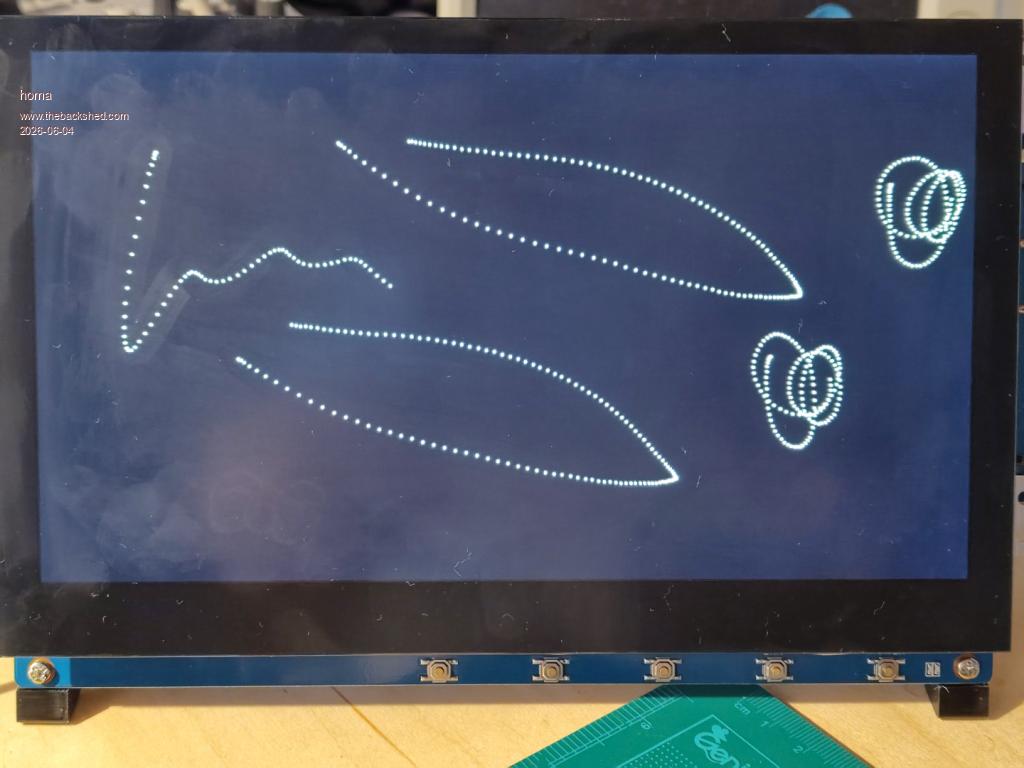
At first I was put off by WhiteWizzard’s report, but I gave it a go anyway. The result is that initially there’s no debug output either, and the “gui test touch” command clears the screen but doesn’t respond to it.
However, I noticed that after a reset and a quick, immediate "gui test touch", there is a brief window during which the screen responds to the test. After that, though, it stops responding. Only a RESET causes the behaviour to reappear, so it is reproducible.
Attached is an image showing single-touch and two-finger-touch.
Matthias
Update: I can even reconnect the Microsoft mouse/keyboard dongle without a Hex Debug message appearing. However, the behaviour remains the same. The pump demo works via touch for a brief moment, then there is no response again. After that, it only works with the mouse. Edited 2026-06-04 18:30 by homa
matherp Guru Joined: 11/12/2012 Location: United KingdomPosts: 12040
Posted: 08:30am 04 Jun 2026
Copy link to clipboard
Print this post
Matthias
I'm unclear what you are reporting. Is multi-touch now working but stops after a period? Does single touch also now stop when it didn't before?
homa Guru Joined: 05/11/2021 Location: GermanyPosts: 718
Posted: 08:34am 04 Jun 2026
Copy link to clipboard
Print this post
Peter,
1. RESET 2. Output:
PicoMiteHDMI MMBasic USB RP2350A Edition V6.03.00RC16 Copyright 2011-2026 Geoff Graham Copyright 2016-2026 Peter Mather
> Multi-touch Connected on channel 4 (10 contacts, 16384x16384) > GR USB Keyboard Connected on channel 1 > USB Mouse Connected on channel 2 >
3. gui test touch <--- immediate entry 4. You have about 5 seconds to test the touch, whether single or multi-touch! After that, only the touch function stops working. The Pico can still be fully operated via the terminal. 5. goto 1
Matthias
Footnote added 2026-06-04 18:35 by homa With the RC15, the touch operates in single-mode throughout!
Page 17 of 31
Print this page
The Back Shed's forum code is written, and hosted, in Australia.

 Notice. New forum software under development. It's going to miss a few functions and look a bit ugly for a while, but I'm working on it full time now as the old forum was too unstable. Couple days, all good. If you notice any issues, please contact me.


 Print this post