| Author |
Message |
Mixtel90

Guru

Joined: 05/10/2019
Location: United KingdomPosts: 9220 |
| Posted: 10:04am 13 Sep 2026 |
 Copy link to clipboard Copy link to clipboard |
 Print this post |
|
At last...
There are quite a few changes since the version originally posted on the other thread so I've created a new one.
PC3x 1.1 Construction pack.zip
Not available ready built, this is a DIY project. I've kept most of the bits as through-hole for those of a nervous disposition.
At the moment I only have the 1.0 version using the Pimoroni module but I've now had it running MMBasic fine in all display resolutions. It configures using OPTION RESET PICO COMPUTER 3 as you'd expect and I've no reason to think that it won't run other firmware for that platform.
Price-wise it's not unreasonable for a one-off. You have a choice of using either of the Pimoroni PGA2350 or the Waveshare CORE 2350B modules. If you choose the Pimoroni path you could get the RM2 and the Adafruit DVI breakout module at the same time to save on postage. Almost everything else barring the PCB and enclosure can be found on AliExpress.
Some differences:
There is no brownout protection chip.
There are no indicator lights for the USB sockets.
USB current protection is crude but effective, using a self-resetting fuse.
The power button is bigger and you can get it in many colours. ;)
Have fun. :)
Mick
Zilog Inside! nascom.info for Nascom & Gemini |
| |
Mixtel90
Guru
Joined: 05/10/2019
Location: United KingdomPosts: 9220 |
| Posted: 01:35pm 15 Sep 2026 |
Copy link to clipboard |
Print this post |
|
Yes, my prototype (with cardboard front and back panels) will run Elite just fine. :)
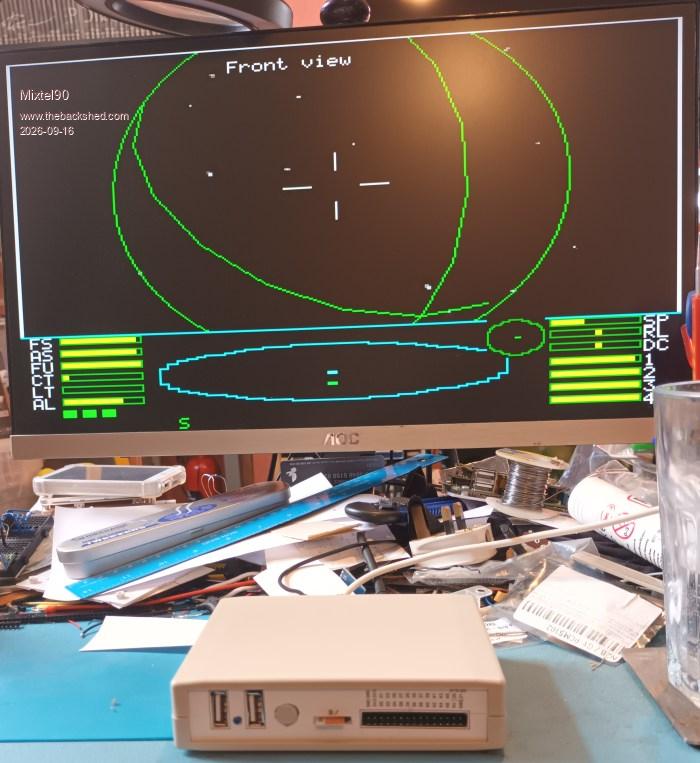
.
Edited 2026-09-16 01:49 by Mixtel90
Mick
Zilog Inside! nascom.info for Nascom & Gemini |
| |
Volhout

Guru
Joined: 05/03/2018
Location: NetherlandsPosts: 6184 |
| Posted: 06:18am 18 Sep 2026 |
Copy link to clipboard |
Print this post |
|
Nice Mick !!!
If you hadn't told me I would not have guessed it was cardboard front.
Volhout
PicomiteVGA PETSCII ROBOTS |
| |
Mixtel90
Guru
Joined: 05/10/2019
Location: United KingdomPosts: 9220 |
| Posted: 07:08am 18 Sep 2026 |
Copy link to clipboard |
Print this post |
|
I'm hoping to eventually learn how to 3D print the panels for my prototypes. Not the RM2015 boxes though, the mini printer that I've only just got only has a bed size of 120mm x 120mm. It's so new (to me - it's second or third hand) that I've yet to do my first print of any sort, never mind create a STL file for anything. :) Give it time - it only arrived yesterday. :)
I did the cardboard panels to test the drawings that I included in the manual - and they are very close. Possible improvements:
Open up the power button hole by about 1mm.
Move the micro SD card slot about 1mm to the left.
I need to investigate how the second error has happened. I have a feeling that my block of the module might be inaccurate. The button hole is simply a case of not allowing enough clearance, I think.
Mick
Zilog Inside! nascom.info for Nascom & Gemini |
| |
Mixtel90
Guru
Joined: 05/10/2019
Location: United KingdomPosts: 9220 |
| Posted: 03:45pm 18 Oct 2026 |
Copy link to clipboard |
Print this post |
|
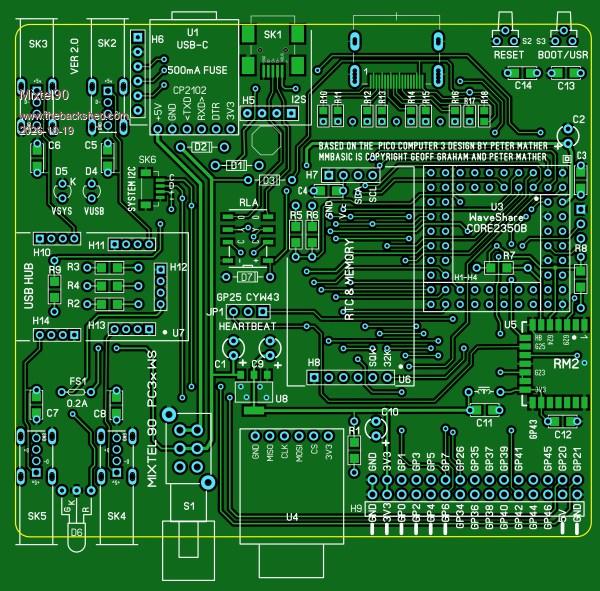
A lot of minor updates: PC3xWS Version 2
This uses the WaveShare CORE2350B which I ordered from AliExoress. This is one of the cheapest sources for this chip. You can get it with zero, 2GB, 4GB or 8GB of PSRAM. You CAN'T use the Pimoroni PGA2350 or any direct clones of it.
I intend to get some boards and check the design before issuing the gerbers, but if anyone wants to take the risk... I've checked the design pretty well in SL6 so I don't *think* there are any nasties but you can always miss something.
* PROG connector changed from micro USB to mini USB to save board space.
* Powering via PROG automatically changes over from hub to PROG USB using relay and changes LED to red.
* You can now either directly mount HDMI socket and 0805 resistors or use Adafruit module, your choice. If you use the module you will need to bolt it to the board and use spacers as there are protruding lugs underneath it.
* Apart from HDMI resistors, all resistors and small capacitors can be either SMD 1206 or through-hole, your choice.
* RESET and BOOT/USR buttons on rear.
* There is space for a ferrite bead in the 3V3 supply to the RM2 as well as an additional capacitor just before it.
* Power chain changed to make it more sensible.
Mick
Zilog Inside! nascom.info for Nascom & Gemini |
| |
Volhout
Guru
Joined: 05/03/2018
Location: NetherlandsPosts: 6184 |
| Posted: 04:48pm 18 Oct 2026 |
Copy link to clipboard |
Print this post |
|
Mick,
This is for the RM2015 case. Are there mounting holes ?
There was an issue with wifi sensitiviteit and ferrite in the 3v3 line to the rif module ? Did you add that filter?
U8 might get warm. Cooling?
Fuse for 5v for the usb hub, but not for 3v3 and 5v on the GPIO header?
Where is the sound chip?
Volhout
Edited 2026-10-19 02:58 by Volhout
PicomiteVGA PETSCII ROBOTS |
| |
Mixtel90
Guru
Joined: 05/10/2019
Location: United KingdomPosts: 9220 |
| Posted: 05:59pm 18 Oct 2026 |
Copy link to clipboard |
Print this post |
|
The mounting holes are invisible here because they have a pad on the bottom layer, which is switched off. :) Yes, it fits the same case but with different panel layouts.
There is a CLC filter using 1uF (C11), a ferrite bead and 100nF (C12). The GND is solid on both top and bottom copper fills.
Just beneath the body of U8 there are 4 vias that link the top and bottom layers. These should help conduct heat through to give me copper area both top and bottom. I did originally have an isolated area on the bottom with vias through the tab of U8 but I changed my mind. It will be dropping 1V7 and does not feed the MCU, only USB and GPIO. Also, the main conductor from the pad is 0.6mm wide and will conduct quite a bit of heat away.
The USB-C module includes a 500mA fuse (which I assume is self resetting). That is the maximum allowable load from a USB-A port on a PC. I fused down the USB hub so that there will be some discrimination with it and shorting a USB shouldn't crash the CPU. Self reset "fuses" are a joke anyway. That's the continuous carry current, not the tripping current. :) There is no other protection for the GPIO 5V and its 3V3 is depending on U8, which is also effectively limited to the same 500mA at which point it will dissipate about 850mW.
There is a I2S sound module mounted upside down and plugged into H5 and H6 over the top of the USB-C and PROG sockets. It has its own 3.5mm jack. The hexagon immediately behind it is a spacer screwed to the board to take strain off the connections as a plug is pushed in.
Mick
Zilog Inside! nascom.info for Nascom & Gemini |
| |
homa

Guru
Joined: 05/11/2021
Location: GermanyPosts: 715 |
| Posted: 06:30pm 18 Oct 2026 |
Copy link to clipboard |
Print this post |
|
I love the look of your workspace – almost as much as I love mine :-) |
| |
Mixtel90
Guru
Joined: 05/10/2019
Location: United KingdomPosts: 9220 |
| Posted: 06:57pm 18 Oct 2026 |
Copy link to clipboard |
Print this post |
|
Hah - you caught it on a moderately tidy day when I had enough room for my keyboard (but not at the same time as the PC3x of course)...
;)
Mick
Zilog Inside! nascom.info for Nascom & Gemini |
| |
Mixtel90
Guru
Joined: 05/10/2019
Location: United KingdomPosts: 9220 |
| Posted: 03:03pm 20 Oct 2026 |
Copy link to clipboard |
Print this post |
|
Slight changes. Almost there now.
Restored the heatsink areas for U8.
Added fuses for the 3V3 and 5V supplies to the GPIO port. Both 0.2A like the USB. All fuses can be through-hole or SMD.
Added 10mA standing load to the output of U8 to keep it regulating.
It's passed DRC and visual tests.
Schematic is just about ready.
Confirmed that the USB-C/UART module does indeed have a 500mA self resetting fuse.
Need to sort out the changes to the manual and BOM.
Incidentally, a 200mA self resetting fuse starts to trip at 400ma. Its resistance then increases and the current falls until it is passing 200mA. Similarly the 500mA fuse starts to trip at 1A. In the tripped state the temperature of these fuses can go up to about 125°C. You don't want to touch them accidentally. They are also very slow to operate so are not great protection against anything other than a severe overload. You can expect this board to be capable of passing up to about 5A from the incoming supply to a GPIO pin for up to about 5 mins. It'd be interesting to test that and see what survives. :)
A rough cost per board using a direct HDMI socket and resistors, without the RM2, is about £23 if you don't mind being left with spare bits. You'll need to actually spend about £33 as there will be 4 spare PCBs and 8 of the components have minimum order quantities between 5 and 50(for £1.23!). Virtually everything is available from AliExpress. The cost will climb if you use the Adafruit DVI breakout board, mainly because of the postage as it's not expensive. You could get a RM2 included in the same postage charge though.
Mick
Zilog Inside! nascom.info for Nascom & Gemini |
| |

 Notice. New forum software under development. It's going to miss a few functions and look a bit ugly for a while, but I'm working on it full time now as the old forum was too unstable. Couple days, all good. If you notice any issues, please contact me.