matherp
Guru

Joined: 11/12/2012
Location: United KingdomPosts: 12039 |
| Posted: 03:26pm 11 Mar 2026 |
 Copy link to clipboard Copy link to clipboard |
 Print this post |
|
For RP2350 VGA or HDMI.
You need to use a local keyboard and set the keyboard repeat as low as possible.
This game was written by CLAUDE 4.6 and took 10 minutes to write with 5 iterations to remove syntax and logical errors.
The obvious update would be to support a gamepad or wii controller - should also be easy enough to port to the Game*Mite and use the buttons.
Not thoroughly tested as I'm crap at games.
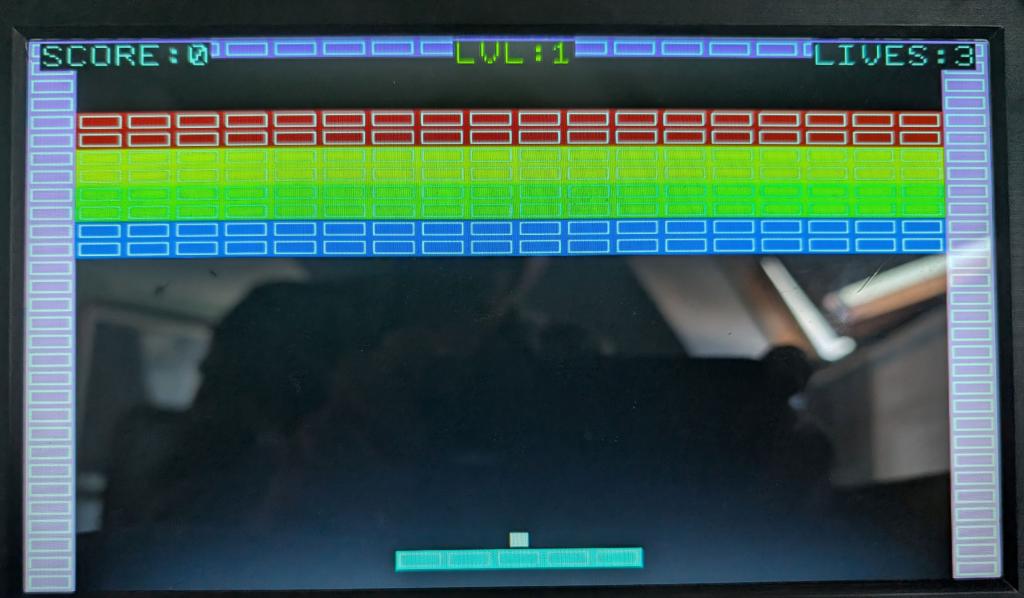
'=============================================
' BREAKOUT - A Tilemap-Based Brick Breaker
'
' Uses TILEMAP for the brick field and
' TILEMAP sprites for the ball and paddle.
' Procedurally generates tileset BMP.
'
' Controls: Left/Right arrows to move paddle
' Space to launch ball
' Q to quit
'
' Requires: MODE 2 (320x240 RGB121), SD card
'=============================================
OPTION EXPLICIT
OPTION BASE 0
MODE 2
' ---- Display constants ----
CONST SCR_W = 320
CONST SCR_H = 240
' ---- Tile dimensions ----
CONST TW = 16 ' tile width
CONST TH = 8 ' tile height (bricks are wide and short)
CONST TPR = 8 ' tiles per row in tileset image
' ---- Map dimensions ----
CONST COLS = 20 ' 20 cols x 16 = 320 pixels = screen width
CONST ROWS = 30 ' 30 rows x 8 = 240 pixels = screen height
' ---- Tile indices ----
CONST T_EMPTY = 0
CONST T_RED = 1 ' 7 points
CONST T_YELLOW = 2 ' 5 points
CONST T_GREEN = 3 ' 3 points
CONST T_BLUE = 4 ' 1 point
CONST T_WALL = 5 ' indestructible border
CONST T_BALL = 6 ' ball sprite tile
CONST T_PADDLE = 7 ' paddle segment tile
CONST T_PADL = 8 ' paddle left end
' ---- Attribute bits ----
CONST A_BRICK = &b0001 ' breakable brick
CONST A_WALL = &b0010 ' solid wall (unbreakable)
CONST A_SOLID = &b0011 ' anything solid
' ---- RGB121 colours ----
CONST C_BLACK = RGB(0,0,0)
CONST C_RED = RGB(255,0,0)
CONST C_YELLOW = RGB(255,255,0)
CONST C_GREEN = RGB(0,255,0)
CONST C_BLUE = RGB(0,0,255)
CONST C_WHITE = RGB(255,255,255)
CONST C_GREY = RGB(128,128,128)
CONST C_COBALT = RGB(0,0,255)
CONST C_CYAN = RGB(0,255,255)
CONST C_BROWN = RGB(255,255,0)
' ---- Game state ----
DIM score, lives, level, bricks_left
DIM ball_x!, ball_y! ' ball position (sub-pixel float)
DIM ball_dx!, ball_dy! ' ball velocity
DIM pad_x ' paddle left edge (pixel)
DIM pad_w ' paddle width in pixels
DIM launched ' has ball been launched?
DIM k$
DIM r, c, ps
DIM new_x!, new_y!
DIM bx, by, hit_t, tcol, trow, hit_a
DIM prev_bx, prev_by, ptcol, ptrow
DIM wprev_bx, wprev_by
DIM edge_t
DIM hit_pos!, pad_centre!
' ---- Speed/difficulty ----
CONST BALL_SPEED! = 0.4
CONST PAD_SPEED = 10
CONST PAD_W_TILES = 5 ' paddle width in tiles
CONST PAD_ROW = 28 ' row where paddle sits
CONST BRICK_START_ROW = 4 ' first row of bricks
CONST BRICK_ROWS = 8 ' rows of bricks
' ============================================
' Setup
' ============================================
PRINT "Generating tileset..."
GenerateTileset
FLASH LOAD IMAGE 1, "breakout_tiles.bmp", O
FRAMEBUFFER CREATE
' ============================================
' Title Screen
' ============================================
TitleScreen:
FRAMEBUFFER WRITE F
CLS C_BLACK
TEXT SCR_W\2, 60, "BREAKOUT", "CM", 7, 2, C_RED
TEXT SCR_W\2, 110, "Arrow keys to move", "CM", 1, 1, C_WHITE
TEXT SCR_W\2, 130, "SPACE to launch ball", "CM", 1, 1, C_WHITE
TEXT SCR_W\2, 150, "Q to quit", "CM", 1, 1, C_GREY
TEXT SCR_W\2, 190, "Press SPACE to start", "CM", 1, 1, C_YELLOW
FRAMEBUFFER COPY F, N
DO : k$ = INKEY$ : LOOP UNTIL k$ = " " OR UCASE$(k$) = "Q"
IF UCASE$(k$) = "Q" THEN GOTO Cleanup
' ============================================
' New Game
' ============================================
score = 0
lives = 3
level = 1
NewLevel:
' Build the map
TILEMAP CLOSE
TILEMAP CREATE mapdata, 1, 1, TW, TH, TPR, COLS, ROWS
TILEMAP ATTR tileattrs, 1, 8
' Count bricks
bricks_left = 0
FOR r = BRICK_START_ROW TO BRICK_START_ROW + BRICK_ROWS - 1
FOR c = 1 TO COLS - 2
IF TILEMAP(TILE 1, c * TW + 1, r * TH + 1) > 0 THEN
IF (TILEMAP(ATTR 1, TILEMAP(TILE 1, c * TW + 1, r * TH + 1)) AND A_BRICK) THEN
bricks_left = bricks_left + 1
END IF
END IF
NEXT c
NEXT r
' Create sprites: ball and paddle segments
TILEMAP SPRITE CREATE 1, 1, T_BALL, SCR_W\2, (PAD_ROW - 1) * TH
' Paddle sprites (5 segments)
pad_x = (SCR_W - PAD_W_TILES * TW) \ 2
FOR ps = 1 TO PAD_W_TILES
TILEMAP SPRITE CREATE ps + 1, 1, T_PADDLE, pad_x + (ps - 1) * TW, PAD_ROW * TH
NEXT ps
' Reset ball
ResetBall:
launched = 0
ball_dx! = BALL_SPEED!
ball_dy! = -BALL_SPEED!
ball_x! = pad_x + (PAD_W_TILES * TW) \ 2 - TW \ 2
ball_y! = (PAD_ROW - 1) * TH
' ============================================
' Main Game Loop
' ============================================
GameLoop:
DO
FRAMEBUFFER WRITE F
CLS C_BLACK
' ---- Input ----
k$ = INKEY$
IF k$ = CHR$(130) THEN ' Left arrow
pad_x = pad_x - PAD_SPEED
IF pad_x < TW THEN pad_x = TW
END IF
IF k$ = CHR$(131) THEN ' Right arrow
pad_x = pad_x + PAD_SPEED
IF pad_x > SCR_W - PAD_W_TILES * TW - TW THEN pad_x = SCR_W - PAD_W_TILES * TW - TW
END IF
IF k$ = " " AND launched = 0 THEN launched = 1
IF UCASE$(k$) = "Q" THEN GOTO Cleanup
' ---- Update paddle sprites ----
FOR ps = 1 TO PAD_W_TILES
TILEMAP SPRITE MOVE ps + 1, pad_x + (ps - 1) * TW, PAD_ROW * TH
NEXT ps
' ---- Ball logic ----
IF launched = 0 THEN
' Ball sits on paddle
ball_x! = pad_x + (PAD_W_TILES * TW) \ 2 - TW \ 2
ball_y! = (PAD_ROW - 1) * TH
ELSE
' Move ball
new_x! = ball_x! + ball_dx!
new_y! = ball_y! + ball_dy!
' ---- Wall collisions ----
' Left wall
IF new_x! < TW THEN
new_x! = TW
ball_dx! = -ball_dx!
END IF
' Right wall
IF new_x! > SCR_W - 2 * TW THEN
new_x! = SCR_W - 2 * TW
ball_dx! = -ball_dx!
END IF
' Top wall
IF new_y! < TH THEN
new_y! = TH
ball_dy! = -ball_dy!
END IF
' ---- Brick collision ----
' Check ball centre against tilemap
bx = INT(new_x!) + TW \ 2
by = INT(new_y!) + TH \ 2
hit_t = TILEMAP(TILE 1, bx, by)
IF hit_t > 0 THEN
hit_a = TILEMAP(ATTR 1, hit_t)
IF (hit_a AND A_BRICK) THEN
' Score based on brick colour
SELECT CASE hit_t
CASE T_RED : score = score + 7
CASE T_YELLOW : score = score + 5
CASE T_GREEN : score = score + 3
CASE T_BLUE : score = score + 1
END SELECT
' Remove brick
tcol = bx \ TW
trow = by \ TH
TILEMAP SET 1, tcol, trow, T_EMPTY
bricks_left = bricks_left - 1
' Bounce: determine which face was hit
prev_bx = INT(ball_x!) + TW \ 2
prev_by = INT(ball_y!) + TH \ 2
ptcol = prev_bx \ TW
ptrow = prev_by \ TH
IF ptcol <> tcol THEN ball_dx! = -ball_dx!
IF ptrow <> trow THEN ball_dy! = -ball_dy!
IF ptcol = tcol AND ptrow = trow THEN
ball_dy! = -ball_dy!
END IF
ELSEIF (hit_a AND A_WALL) THEN
' Bounce off wall
wprev_bx = INT(ball_x!) + TW \ 2
wprev_by = INT(ball_y!) + TH \ 2
IF (wprev_bx \ TW) <> (bx \ TW) THEN ball_dx! = -ball_dx!
IF (wprev_by \ TH) <> (by \ TH) THEN ball_dy! = -ball_dy!
IF (wprev_bx \ TW) = (bx \ TW) AND (wprev_by \ TH) = (by \ TH) THEN
ball_dy! = -ball_dy!
END IF
END IF
END IF
' Also check ball edges for bricks (corners)
' Top edge
edge_t = TILEMAP(TILE 1, bx, INT(new_y!))
IF edge_t > 0 THEN
IF (TILEMAP(ATTR 1, edge_t) AND A_BRICK) THEN
tcol = bx \ TW
trow = INT(new_y!) \ TH
SELECT CASE edge_t
CASE T_RED : score = score + 7
CASE T_YELLOW : score = score + 5
CASE T_GREEN : score = score + 3
CASE T_BLUE : score = score + 1
END SELECT
TILEMAP SET 1, tcol, trow, T_EMPTY
bricks_left = bricks_left - 1
ball_dy! = -ball_dy!
END IF
END IF
' ---- Paddle collision ----
IF ball_dy! > 0 THEN ' only when moving down
IF INT(new_y!) + TH >= PAD_ROW * TH AND INT(new_y!) + TH <= PAD_ROW * TH + TH THEN
IF INT(new_x!) + TW > pad_x AND INT(new_x!) < pad_x + PAD_W_TILES * TW THEN
new_y! = PAD_ROW * TH - TH
ball_dy! = -ABS(ball_dy!)
' Angle based on where ball hits paddle
hit_pos! = (new_x! + TW \ 2 - pad_x) / (PAD_W_TILES * TW)
' hit_pos ranges 0..1, map to angle
ball_dx! = (hit_pos! - 0.5) * BALL_SPEED! * 2
' Clamp horizontal speed
IF ABS(ball_dx!) > BALL_SPEED! * 0.9 THEN
ball_dx! = SGN(ball_dx!) * BALL_SPEED! * 0.9
END IF
' Ensure minimum horizontal movement
IF ABS(ball_dx!) < 0.3 THEN
ball_dx! = SGN(ball_dx!) * 0.3
IF ball_dx! = 0 THEN ball_dx! = 0.3
END IF
' Maintain total speed
ball_dy! = -SQR(BALL_SPEED! * BALL_SPEED! - ball_dx! * ball_dx!)
END IF
END IF
END IF
' ---- Ball lost (bottom) ----
IF new_y! > SCR_H THEN
lives = lives - 1
IF lives <= 0 THEN GOTO GameOver
GOTO ResetBall
END IF
ball_x! = new_x!
ball_y! = new_y!
END IF
' ---- Update ball sprite ----
TILEMAP SPRITE MOVE 1, INT(ball_x!), INT(ball_y!)
' ---- Draw ----
TILEMAP DRAW 1, F, 0, 0, 0, 0, SCR_W, SCR_H
TILEMAP SPRITE DRAW F, 0
' HUD: score and lives
TEXT 4, 1, "SCORE:" + STR$(score), "LT", 1, 1, C_WHITE
TEXT SCR_W - 4, 1, "LIVES:" + STR$(lives), "RT", 1, 1, C_WHITE
TEXT SCR_W \ 2, 1, "LVL:" + STR$(level), "CT", 1, 1, C_YELLOW
FRAMEBUFFER COPY F, N
' ---- Level complete? ----
IF bricks_left <= 0 THEN
level = level + 1
TILEMAP SPRITE CLOSE
GOTO NewLevel
END IF
LOOP
' ============================================
' Game Over
' ============================================
GameOver:
FRAMEBUFFER WRITE F
CLS C_BLACK
TEXT SCR_W\2, 80, "GAME OVER", "CM", 7, 2, C_RED
TEXT SCR_W\2, 130, "Score: " + STR$(score), "CM", 1, 2, C_WHITE
TEXT SCR_W\2, 160, "Level: " + STR$(level), "CM", 1, 1, C_YELLOW
TEXT SCR_W\2, 200, "SPACE=Play Again Q=Quit", "CM", 1, 1, C_GREY
FRAMEBUFFER COPY F, N
DO : k$ = INKEY$ : LOOP UNTIL k$ = " " OR UCASE$(k$) = "Q"
IF k$ = " " THEN GOTO TitleScreen
' ============================================
' Cleanup
' ============================================
Cleanup:
TILEMAP CLOSE
FRAMEBUFFER CLOSE
CLS
PRINT "Thanks for playing!"
PRINT "Final score: "; score
END
' ============================================
' SUBROUTINES
' ============================================
SUB GenerateTileset
' Create tileset: 8 tiles per row, 2 rows = 128x16 px
' Tile size: 16 x 8 pixels
LOCAL tx, ty
CLS C_BLACK
' Tile 1: Red brick
tx = 0 : ty = 0
BOX tx, ty, TW, TH, 0, C_RED, C_RED
BOX tx+1, ty+1, TW-2, TH-2, 1, C_WHITE
' Tile 2: Yellow brick
tx = TW : ty = 0
BOX tx, ty, TW, TH, 0, C_YELLOW, C_YELLOW
BOX tx+1, ty+1, TW-2, TH-2, 1, C_WHITE
' Tile 3: Green brick
tx = TW * 2 : ty = 0
BOX tx, ty, TW, TH, 0, C_GREEN, C_GREEN
BOX tx+1, ty+1, TW-2, TH-2, 1, C_WHITE
' Tile 4: Blue brick
tx = TW * 3 : ty = 0
BOX tx, ty, TW, TH, 0, C_BLUE, C_BLUE
BOX tx+1, ty+1, TW-2, TH-2, 1, C_WHITE
' Tile 5: Wall (grey border)
tx = TW * 4 : ty = 0
BOX tx, ty, TW, TH, 0, C_GREY, C_GREY
BOX tx+1, ty+1, TW-2, TH-2, 1, C_WHITE
' Tile 6: Ball (white square on black)
tx = TW * 5 : ty = 0
BOX tx, ty, TW, TH, 0, C_BLACK, C_BLACK
BOX tx+TW\2-3, ty+TH\2-3, 6, 6, 0, C_WHITE, C_WHITE
' Tile 7: Paddle segment (cyan)
tx = TW * 6 : ty = 0
BOX tx, ty, TW, TH, 0, C_CYAN, C_CYAN
BOX tx+1, ty+1, TW-2, TH-2, 1, C_WHITE
' Tile 8: Paddle left (same as paddle for now)
tx = TW * 7 : ty = 0
BOX tx, ty, TW, TH, 0, C_CYAN, C_CYAN
BOX tx+1, ty+1, TW-2, TH-2, 1, C_WHITE
SAVE IMAGE "breakout_tiles.bmp", 0, 0, TPR * TW, TH
END SUB
' ============================================
' MAP DATA: 20 cols x 30 rows = 600 values
' ============================================
mapdata:
' Row 0: top wall
DATA 5,5,5,5,5,5,5,5,5,5,5,5,5,5,5,5,5,5,5,5
' Row 1: side walls, HUD space
DATA 5,0,0,0,0,0,0,0,0,0,0,0,0,0,0,0,0,0,0,5
' Row 2: empty
DATA 5,0,0,0,0,0,0,0,0,0,0,0,0,0,0,0,0,0,0,5
' Row 3: empty
DATA 5,0,0,0,0,0,0,0,0,0,0,0,0,0,0,0,0,0,0,5
' Row 4: red bricks
DATA 5,1,1,1,1,1,1,1,1,1,1,1,1,1,1,1,1,1,1,5
' Row 5: red bricks
DATA 5,1,1,1,1,1,1,1,1,1,1,1,1,1,1,1,1,1,1,5
' Row 6: yellow bricks
DATA 5,2,2,2,2,2,2,2,2,2,2,2,2,2,2,2,2,2,2,5
' Row 7: yellow bricks
DATA 5,2,2,2,2,2,2,2,2,2,2,2,2,2,2,2,2,2,2,5
' Row 8: green bricks
DATA 5,3,3,3,3,3,3,3,3,3,3,3,3,3,3,3,3,3,3,5
' Row 9: green bricks
DATA 5,3,3,3,3,3,3,3,3,3,3,3,3,3,3,3,3,3,3,5
' Row 10: blue bricks
DATA 5,4,4,4,4,4,4,4,4,4,4,4,4,4,4,4,4,4,4,5
' Row 11: blue bricks
DATA 5,4,4,4,4,4,4,4,4,4,4,4,4,4,4,4,4,4,4,5
' Row 12: empty
DATA 5,0,0,0,0,0,0,0,0,0,0,0,0,0,0,0,0,0,0,5
' Row 13: empty
DATA 5,0,0,0,0,0,0,0,0,0,0,0,0,0,0,0,0,0,0,5
' Row 14: empty
DATA 5,0,0,0,0,0,0,0,0,0,0,0,0,0,0,0,0,0,0,5
' Row 15: empty
DATA 5,0,0,0,0,0,0,0,0,0,0,0,0,0,0,0,0,0,0,5
' Row 16: empty
DATA 5,0,0,0,0,0,0,0,0,0,0,0,0,0,0,0,0,0,0,5
' Row 17: empty
DATA 5,0,0,0,0,0,0,0,0,0,0,0,0,0,0,0,0,0,0,5
' Row 18: empty
DATA 5,0,0,0,0,0,0,0,0,0,0,0,0,0,0,0,0,0,0,5
' Row 19: empty
DATA 5,0,0,0,0,0,0,0,0,0,0,0,0,0,0,0,0,0,0,5
' Row 20: empty
DATA 5,0,0,0,0,0,0,0,0,0,0,0,0,0,0,0,0,0,0,5
' Row 21: empty
DATA 5,0,0,0,0,0,0,0,0,0,0,0,0,0,0,0,0,0,0,5
' Row 22: empty
DATA 5,0,0,0,0,0,0,0,0,0,0,0,0,0,0,0,0,0,0,5
' Row 23: empty
DATA 5,0,0,0,0,0,0,0,0,0,0,0,0,0,0,0,0,0,0,5
' Row 24: empty
DATA 5,0,0,0,0,0,0,0,0,0,0,0,0,0,0,0,0,0,0,5
' Row 25: empty
DATA 5,0,0,0,0,0,0,0,0,0,0,0,0,0,0,0,0,0,0,5
' Row 26: empty
DATA 5,0,0,0,0,0,0,0,0,0,0,0,0,0,0,0,0,0,0,5
' Row 27: empty
DATA 5,0,0,0,0,0,0,0,0,0,0,0,0,0,0,0,0,0,0,5
' Row 28: empty (paddle row - paddle is a sprite)
DATA 5,0,0,0,0,0,0,0,0,0,0,0,0,0,0,0,0,0,0,5
' Row 29: open bottom (ball death zone)
DATA 5,0,0,0,0,0,0,0,0,0,0,0,0,0,0,0,0,0,0,5
' ============================================
' TILE ATTRIBUTES (8 tile types)
' ============================================
tileattrs:
DATA 1 ' tile 1: red brick - A_BRICK
DATA 1 ' tile 2: yellow brick - A_BRICK
DATA 1 ' tile 3: green brick - A_BRICK
DATA 1 ' tile 4: blue brick - A_BRICK
DATA 2 ' tile 5: wall - A_WALL
DATA 0 ' tile 6: ball - none
DATA 0 ' tile 7: paddle - none
DATA 0 ' tile 8: paddle left - none
|
matherp
Guru
Joined: 11/12/2012
Location: United KingdomPosts: 12039 |
| Posted: 10:45am 12 Mar 2026 |
Copy link to clipboard |
Print this post |
|
Here is a version tuned for the Game*Mite
'=============================================
' BREAKOUT - A Tilemap-Based Brick Breaker
'
' Uses TILEMAP for the brick field and
' TILEMAP sprites for the ball and paddle.
' Procedurally generates tileset BMP.
'
' Controls: Left/Right arrows to move paddle
' Space to launch ball
' Q to quit
'
' Requires: MODE 2 (320x240 RGB121), SD card
'=============================================
Option EXPLICIT
Option BASE 0
SetPin gp8,din,pullup
SetPin gp9,din,pullup
SetPin gp10,din,pullup
SetPin gp11,din,pullup
SetPin gp12,din,pullup
SetPin gp13,din,pullup
SetPin gp14,din,pullup
SetPin gp15,din,pullup
' ---- Display constants ----
Const SCR_W = 320
Const SCR_H = 240
' ---- Tile dimensions ----
Const TW = 16 ' tile width
Const TH = 8 ' tile height (bricks are wide and short)
Const TPR = 8 ' tiles per row in tileset image
' ---- Map dimensions ----
Const COLS = 20 ' 20 cols x 16 = 320 pixels = screen width
Const ROWS = 30 ' 30 rows x 8 = 240 pixels = screen height
' ---- Tile indices ----
Const T_EMPTY = 0
Const T_RED = 1 ' 7 points
Const T_YELLOW = 2 ' 5 points
Const T_GREEN = 3 ' 3 points
Const T_BLUE = 4 ' 1 point
Const T_WALL = 5 ' indestructible border
Const T_BALL = 6 ' ball sprite tile
Const T_PADDLE = 7 ' paddle segment tile
Const T_PADL = 8 ' paddle left end
' ---- Attribute bits ----
Const A_BRICK = &b0001 ' breakable brick
Const A_WALL = &b0010 ' solid wall (unbreakable)
Const A_SOLID = &b0011 ' anything solid
' ---- RGB121 colours ----
Const C_BLACK = RGB(0,0,0)
Const C_RED = RGB(255,0,0)
Const C_YELLOW = RGB(255,255,0)
Const C_GREEN = RGB(0,255,0)
Const C_BLUE = RGB(0,0,255)
Const C_WHITE = RGB(255,255,255)
Const C_GREY = RGB(128,128,128)
Const C_COBALT = RGB(0,0,255)
Const C_CYAN = RGB(0,255,255)
Const C_BROWN = RGB(255,255,0)
' ---- Game state ----
Dim score, lives, level, bricks_left
Dim ball_x!, ball_y! ' ball position (sub-pixel float)
Dim ball_dx!, ball_dy! ' ball velocity
Dim pad_x ' paddle left edge (pixel)
Dim pad_w ' paddle width in pixels
Dim launched ' has ball been launched?
Dim k$
Dim r, c, ps
Dim new_x!, new_y!
Dim bx, by, hit_t, tcol, trow, hit_a
Dim prev_bx, prev_by, ptcol, ptrow
Dim wprev_bx, wprev_by
Dim edge_t
Dim hit_pos!, pad_centre!
' ---- Speed/difficulty ----
Const BALL_SPEED! = 4.0
Const PAD_SPEED = 10
Const PAD_W_TILES = 5 ' paddle width in tiles
Const PAD_ROW = 28 ' row where paddle sits
Const BRICK_START_ROW = 4 ' first row of bricks
Const BRICK_ROWS = 8 ' rows of bricks
' ============================================
' Setup
' ============================================
Print "Generating tileset..."
GenerateTileset
Flash LOAD IMAGE 1, "breakout_tiles.bmp", O
FRAMEBUFFER CREATE
' ============================================
' Title Screen
' ============================================
TitleScreen:
FRAMEBUFFER WRITE F
CLS C_BLACK
Text SCR_W\2, 60, "BREAKOUT", "CM", 7, 2, C_RED
Text SCR_W\2, 110, "Left and Right Buttons to move", "CM", 1, 1, C_WHITE
Text SCR_W\2, 130, "A to launch ball", "CM", 1, 1, C_WHITE
Text SCR_W\2, 150, "B to quit", "CM", 1, 1, C_GREY
Text SCR_W\2, 190, "Press SELECT to start", "CM", 1, 1, C_YELLOW
FRAMEBUFFER COPY F, N
Do : k$ = GetPress() : Loop Until k$ = " " Or UCase$(k$) = "Q"
If UCase$(k$) = "Q" Then GoTo Cleanup
' ============================================
' New Game
' ============================================
score = 0
lives = 3
level = 1
NewLevel:
' Build the map
Tilemap CLOSE
Tilemap CREATE mapdata, 1, 1, TW, TH, TPR, COLS, ROWS
Tilemap ATTR tileattrs, 1, 8
BALL_SPEED=BALL_SPEED*1.25
' Count bricks
bricks_left = 0
For r = BRICK_START_ROW To BRICK_START_ROW + BRICK_ROWS - 1
For c = 1 To COLS - 2
If Tilemap(TILE 1, c * TW + 1, r * TH + 1) > 0 Then
If (Tilemap(ATTR 1, Tilemap(TILE 1, c * TW + 1, r * TH + 1)) And A_BRICK)
Then
bricks_left = bricks_left + 1
End If
End If
Next c
Next r
' Create sprites: ball and paddle segments
Tilemap SPRITE CREATE 1, 1, T_BALL, SCR_W\2, (PAD_ROW - 1) * TH
' Paddle sprites (5 segments)
pad_x = (SCR_W - PAD_W_TILES * TW) \ 2
For ps = 1 To PAD_W_TILES
Tilemap SPRITE CREATE ps + 1, 1, T_PADDLE, pad_x + (ps - 1) * TW, PAD_ROW * TH
Next ps
' Reset ball
ResetBall:
launched = 0
ball_dx! = BALL_SPEED!
ball_dy! = -BALL_SPEED!
ball_x! = pad_x + (PAD_W_TILES * TW) \ 2 - TW \ 2
ball_y! = (PAD_ROW - 1) * TH
' ============================================
' Main Game Loop
' ============================================
GameLoop:
Do
FRAMEBUFFER WRITE F
CLS C_BLACK
' ---- Input ----
k$ = GetPress()
If k$ = Chr$(130) Then ' Left arrow
pad_x = pad_x - PAD_SPEED
If pad_x < TW Then pad_x = TW
End If
If k$ = Chr$(131) Then ' Right arrow
pad_x = pad_x + PAD_SPEED
If pad_x > SCR_W - PAD_W_TILES * TW - TW Then pad_x = SCR_W - PAD_W_TILES *
TW - TW
End If
If k$ = "L" And launched = 0 Then launched = 1
If UCase$(k$) = "Q" Then GoTo Cleanup
' ---- Update paddle sprites ----
For ps = 1 To PAD_W_TILES
Tilemap SPRITE MOVE ps + 1, pad_x + (ps - 1) * TW, PAD_ROW * TH
Next ps
' ---- Ball logic ----
If launched = 0 Then
' Ball sits on paddle
ball_x! = pad_x + (PAD_W_TILES * TW) \ 2 - TW \ 2
ball_y! = (PAD_ROW - 1) * TH
Else
' Move ball
new_x! = ball_x! + ball_dx!
new_y! = ball_y! + ball_dy!
' ---- Wall collisions ----
' Left wall
If new_x! < TW Then
new_x! = TW
ball_dx! = -ball_dx!
End If
' Right wall
If new_x! > SCR_W - 2 * TW Then
new_x! = SCR_W - 2 * TW
ball_dx! = -ball_dx!
End If
' Top wall
If new_y! < TH Then
new_y! = TH
ball_dy! = -ball_dy!
End If
' ---- Brick collision ----
' Check ball centre against tilemap
bx = Int(new_x!) + TW \ 2
by = Int(new_y!) + TH \ 2
hit_t = Tilemap(TILE 1, bx, by)
If hit_t > 0 Then
hit_a = Tilemap(ATTR 1, hit_t)
If (hit_a And A_BRICK) Then
' Score based on brick colour
Select Case hit_t
Case T_RED : score = score + 7
Case T_YELLOW : score = score + 5
Case T_GREEN : score = score + 3
Case T_BLUE : score = score + 1
End Select
' Remove brick
tcol = bx \ TW
trow = by \ TH
Tilemap SET 1, tcol, trow, T_EMPTY
bricks_left = bricks_left - 1
' Bounce: determine which face was hit
prev_bx = Int(ball_x!) + TW \ 2
prev_by = Int(ball_y!) + TH \ 2
ptcol = prev_bx \ TW
ptrow = prev_by \ TH
If ptcol <> tcol Then ball_dx! = -ball_dx!
If ptrow <> trow Then ball_dy! = -ball_dy!
If ptcol = tcol And ptrow = trow Then
ball_dy! = -ball_dy!
End If
ElseIf (hit_a And A_WALL) Then
' Bounce off wall
wprev_bx = Int(ball_x!) + TW \ 2
wprev_by = Int(ball_y!) + TH \ 2
If (wprev_bx \ TW) <> (bx \ TW) Then ball_dx! = -ball_dx!
If (wprev_by \ TH) <> (by \ TH) Then ball_dy! = -ball_dy!
If (wprev_bx \ TW) = (bx \ TW) And (wprev_by \ TH) = (by \ TH) Then
ball_dy! = -ball_dy!
End If
End If
End If
' Also check ball edges for bricks (corners)
' Top edge
edge_t = Tilemap(TILE 1, bx, Int(new_y!))
If edge_t > 0 Then
If (Tilemap(ATTR 1, edge_t) And A_BRICK) Then
tcol = bx \ TW
trow = Int(new_y!) \ TH
Select Case edge_t
Case T_RED : score = score + 7
Case T_YELLOW : score = score + 5
Case T_GREEN : score = score + 3
Case T_BLUE : score = score + 1
End Select
Tilemap SET 1, tcol, trow, T_EMPTY
bricks_left = bricks_left - 1
ball_dy! = -ball_dy!
End If
End If
' ---- Paddle collision ----
If ball_dy! > 0 Then ' only when moving down
If Int(new_y!) + TH >= PAD_ROW * TH And Int(new_y!) + TH <= PAD_ROW * TH +
TH Then
If Int(new_x!) + TW > pad_x And Int(new_x!) < pad_x + PAD_W_TILES * TW T
hen
new_y! = PAD_ROW * TH - TH
ball_dy! = -Abs(ball_dy!)
' Angle based on where ball hits paddle
hit_pos! = (new_x! + TW \ 2 - pad_x) / (PAD_W_TILES * TW)
' hit_pos ranges 0..1, map to angle
ball_dx! = (hit_pos! - 0.5) * BALL_SPEED! * 2
' Clamp horizontal speed
If Abs(ball_dx!) > BALL_SPEED! * 0.9 Then
ball_dx! = Sgn(ball_dx!) * BALL_SPEED! * 0.9
End If
' Ensure minimum horizontal movement
If Abs(ball_dx!) < 0.3 Then
ball_dx! = Sgn(ball_dx!) * 0.3
If ball_dx! = 0 Then ball_dx! = 0.3
End If
' Maintain total speed
ball_dy! = -Sqr(BALL_SPEED! * BALL_SPEED! - ball_dx! * ball_dx!)
End If
End If
End If
' ---- Ball lost (bottom) ----
If new_y! > SCR_H Then
lives = lives - 1
If lives <= 0 Then GoTo GameOver
GoTo ResetBall
End If
ball_x! = new_x!
ball_y! = new_y!
End If
' ---- Update ball sprite ----
Tilemap SPRITE MOVE 1, Int(ball_x!), Int(ball_y!)
' ---- Draw ----
Tilemap DRAW 1, F, 0, 0, 0, 0, SCR_W, SCR_H
Tilemap SPRITE DRAW F, 0
' HUD: score and lives
Text 4, 1, "SCORE:" + Str$(score), "LT", 1, 1, C_WHITE
Text SCR_W - 4, 1, "LIVES:" + Str$(lives), "RT", 1, 1, C_WHITE
Text SCR_W \ 2, 1, "LVL:" + Str$(level), "CT", 1, 1, C_YELLOW
FRAMEBUFFER COPY F, N
' ---- Level complete? ----
If bricks_left <= 0 Then
level = level + 1
Tilemap SPRITE CLOSE
GoTo NewLevel
End If
Loop
' ============================================
' Game Over
' ============================================
GameOver:
FRAMEBUFFER WRITE F
CLS C_BLACK
Text SCR_W\2, 80, "GAME OVER", "CM", 7, 2, C_RED
Text SCR_W\2, 130, "Score: " + Str$(score), "CM", 1, 2, C_WHITE
Text SCR_W\2, 160, "Level: " + Str$(level), "CM", 1, 1, C_YELLOW
Text SCR_W\2, 200, "SPACE=Play Again Q=Quit", "CM", 1, 1, C_GREY
FRAMEBUFFER COPY F, N
Do : k$ = GetPress() : Loop Until k$ = " " Or UCase$(k$) = "Q"
If k$ = " " Then GoTo TitleScreen
' ============================================
' Cleanup
' ============================================
Cleanup:
Tilemap CLOSE
FRAMEBUFFER CLOSE
CLS
Print "Thanks for playing!"
Print "Final score: "; score
End
' ============================================
' SUBROUTINES
' ============================================
Sub GenerateTileset
' Create tileset: 8 tiles per row, 2 rows = 128x16 px
' Tile size: 16 x 8 pixels
Local tx, ty
CLS C_BLACK
' Tile 1: Red brick
tx = 0 : ty = 0
Box tx, ty, TW, TH, 0, C_RED, C_RED
Box tx+1, ty+1, TW-2, TH-2, 1, C_WHITE
' Tile 2: Yellow brick
tx = TW : ty = 0
Box tx, ty, TW, TH, 0, C_YELLOW, C_YELLOW
Box tx+1, ty+1, TW-2, TH-2, 1, C_WHITE
' Tile 3: Green brick
tx = TW * 2 : ty = 0
Box tx, ty, TW, TH, 0, C_GREEN, C_GREEN
Box tx+1, ty+1, TW-2, TH-2, 1, C_WHITE
' Tile 4: Blue brick
tx = TW * 3 : ty = 0
Box tx, ty, TW, TH, 0, C_BLUE, C_BLUE
Box tx+1, ty+1, TW-2, TH-2, 1, C_WHITE
' Tile 5: Wall (grey border)
tx = TW * 4 : ty = 0
Box tx, ty, TW, TH, 0, C_GREY, C_GREY
Box tx+1, ty+1, TW-2, TH-2, 1, C_WHITE
' Tile 6: Ball (white square on black)
tx = TW * 5 : ty = 0
Box tx, ty, TW, TH, 0, C_BLACK, C_BLACK
Box tx+TW\2-3, ty+TH\2-3, 6, 6, 0, C_WHITE, C_WHITE
' Tile 7: Paddle segment (cyan)
tx = TW * 6 : ty = 0
Box tx, ty, TW, TH, 0, C_CYAN, C_CYAN
Box tx+1, ty+1, TW-2, TH-2, 1, C_WHITE
' Tile 8: Paddle left (same as paddle for now)
tx = TW * 7 : ty = 0
Box tx, ty, TW, TH, 0, C_CYAN, C_CYAN
Box tx+1, ty+1, TW-2, TH-2, 1, C_WHITE
Save IMAGE "breakout_tiles.bmp", 0, 0, TPR * TW, TH
End Sub
' ============================================
' MAP DATA: 20 cols x 30 rows = 600 values
' ============================================
mapdata:
' Row 0: top wall
Data 5,5,5,5,5,5,5,5,5,5,5,5,5,5,5,5,5,5,5,5
' Row 1: side walls, HUD space
Data 5,0,0,0,0,0,0,0,0,0,0,0,0,0,0,0,0,0,0,5
' Row 2: empty
Data 5,0,0,0,0,0,0,0,0,0,0,0,0,0,0,0,0,0,0,5
' Row 3: empty
Data 5,0,0,0,0,0,0,0,0,0,0,0,0,0,0,0,0,0,0,5
' Row 4: red bricks
Data 5,1,1,1,1,1,1,1,1,1,1,1,1,1,1,1,1,1,1,5
' Row 5: red bricks
Data 5,1,1,1,1,1,1,1,1,1,1,1,1,1,1,1,1,1,1,5
' Row 6: yellow bricks
Data 5,2,2,2,2,2,2,2,2,2,2,2,2,2,2,2,2,2,2,5
' Row 7: yellow bricks
Data 5,2,2,2,2,2,2,2,2,2,2,2,2,2,2,2,2,2,2,5
' Row 8: green bricks
Data 5,3,3,3,3,3,3,3,3,3,3,3,3,3,3,3,3,3,3,5
' Row 9: green bricks
Data 5,3,3,3,3,3,3,3,3,3,3,3,3,3,3,3,3,3,3,5
' Row 10: blue bricks
Data 5,4,4,4,4,4,4,4,4,4,4,4,4,4,4,4,4,4,4,5
' Row 11: blue bricks
Data 5,4,4,4,4,4,4,4,4,4,4,4,4,4,4,4,4,4,4,5
' Row 12: empty
Data 5,0,0,0,0,0,0,0,0,0,0,0,0,0,0,0,0,0,0,5
' Row 13: empty
Data 5,0,0,0,0,0,0,0,0,0,0,0,0,0,0,0,0,0,0,5
' Row 14: empty
Data 5,0,0,0,0,0,0,0,0,0,0,0,0,0,0,0,0,0,0,5
' Row 15: empty
Data 5,0,0,0,0,0,0,0,0,0,0,0,0,0,0,0,0,0,0,5
' Row 16: empty
Data 5,0,0,0,0,0,0,0,0,0,0,0,0,0,0,0,0,0,0,5
' Row 17: empty
Data 5,0,0,0,0,0,0,0,0,0,0,0,0,0,0,0,0,0,0,5
' Row 18: empty
Data 5,0,0,0,0,0,0,0,0,0,0,0,0,0,0,0,0,0,0,5
' Row 19: empty
Data 5,0,0,0,0,0,0,0,0,0,0,0,0,0,0,0,0,0,0,5
' Row 20: empty
Data 5,0,0,0,0,0,0,0,0,0,0,0,0,0,0,0,0,0,0,5
' Row 21: empty
Data 5,0,0,0,0,0,0,0,0,0,0,0,0,0,0,0,0,0,0,5
' Row 22: empty
Data 5,0,0,0,0,0,0,0,0,0,0,0,0,0,0,0,0,0,0,5
' Row 23: empty
Data 5,0,0,0,0,0,0,0,0,0,0,0,0,0,0,0,0,0,0,5
' Row 24: empty
Data 5,0,0,0,0,0,0,0,0,0,0,0,0,0,0,0,0,0,0,5
' Row 25: empty
Data 5,0,0,0,0,0,0,0,0,0,0,0,0,0,0,0,0,0,0,5
' Row 26: empty
Data 5,0,0,0,0,0,0,0,0,0,0,0,0,0,0,0,0,0,0,5
' Row 27: empty
Data 5,0,0,0,0,0,0,0,0,0,0,0,0,0,0,0,0,0,0,5
' Row 28: empty (paddle row - paddle is a sprite)
Data 5,0,0,0,0,0,0,0,0,0,0,0,0,0,0,0,0,0,0,5
' Row 29: open bottom (ball death zone)
Data 5,0,0,0,0,0,0,0,0,0,0,0,0,0,0,0,0,0,0,5
' ============================================
' TILE ATTRIBUTES (8 tile types)
' ============================================
tileattrs:
Data 1 ' tile 1: red brick - A_BRICK
Data 1 ' tile 2: yellow brick - A_BRICK
Data 1 ' tile 3: green brick - A_BRICK
Data 1 ' tile 4: blue brick - A_BRICK
Data 2 ' tile 5: wall - A_WALL
Data 0 ' tile 6: ball - none
Data 0 ' tile 7: paddle - none
Data 0 ' tile 8: paddle left - none
Function GetPress() As string
Local x% = Port(GP8,8)
Local y%=x% Xor &HFF
Select Case y%
Case 2
GetPress=Chr$(130)
Case 8
GetPress=Chr$(131)
Case 64
GetPress="Q"
Case 128
GetPress="L"
Case 16
GetPress=" "
Case Else
GetPress=""
End Select
End Function |

 Notice. New forum software under development. It's going to miss a few functions and look a bit ugly for a while, but I'm working on it full time now as the old forum was too unstable. Couple days, all good. If you notice any issues, please contact me.