Home
JAQForum Ver 24.01
Log In or Join  
Active Topics
Local Time 03:48 22 Jul 2026 Privacy Policy
Jump to

Notice. New forum software under development. It's going to miss a few functions and look a bit ugly for a while, but I'm working on it full time now as the old forum was too unstable. Couple days, all good. If you notice any issues, please contact me.

Forum Index : Microcontroller and PC projects : PicoMite on a

Author Message
Xian
Newbie

Joined: 19/03/2025
Location: Germany
Posts: 39
Posted: 08:10pm 07 Jul 2026
Copy link to clipboard 
Print this post

Hello All,

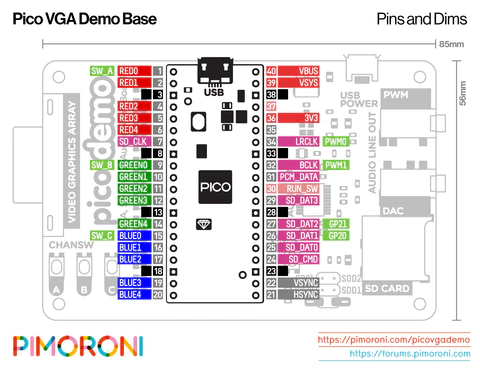
hast someone already tried to get PicoMite working on a "Pimoroni Pico VGA Demo Base" and a PiPico 2? How to achieve a working environment and which options must be used?
Any suggestions are higly welcome!

Thanks and Regards,

Xian
 
homa

Guru

Joined: 05/11/2021
Location: Germany
Posts: 651
Posted: 10:10pm 07 Jul 2026
Copy link to clipboard 
Print this post


Hello Xian,

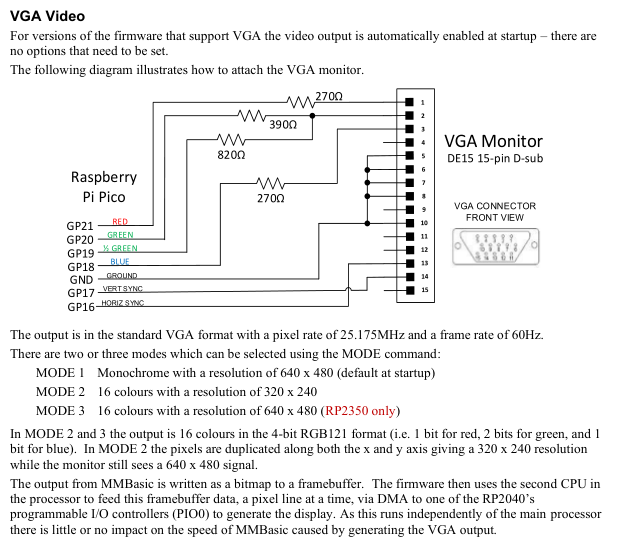
That won’t work straight out of the box. Take a look at the VGA control section in the manual – it’s different from your board.
One bold idea would be to use the standard MMBasic version for the Pico and handle the VGA part via the PIO. Peter posted an example of this at some point. I just can’t remember whether it was for HDMI or VGA?! You’d have to adapt it quite extensively, of course. You'd also need to consider the input method (PS/2 keyboard or everything via the terminal).
Overall, I don't think it's really feasible.

Matthias
 
phil99

Guru

Joined: 11/02/2018
Location: Australia
Posts: 3321
Posted: 10:24pm 07 Jul 2026
Copy link to clipboard 
Print this post

Had a look at the diagram on the Pimoroni site and its VGA output uses a total of 17 pins, 5 for each primary colour plus 2 for sync.
PicoMite VGA uses 1 red, 2 green 1 blue and 2 sync pins so is not compatible.

Standard PicoMite firmware might work on it (no video output) but the 17 pins going to the VGA connector would be hard to access for other things.

I think they call it a Demo-Base as it would be difficult to run anything except their Demo firmware. The memory required to drive so many VGA pins would leave little room for anything else.

Edit.
Homa posted while I was writing. His pics show the problem.
Edited 2026-07-08 08:30 by phil99
 
al18
Senior Member

Joined: 06/07/2019
Location: United States
Posts: 247
Posted: 01:39am 08 Jul 2026
Copy link to clipboard 
Print this post

The low cost board to use a Pico 1 or Pico 2 board is the Olimex RP-2040-PC - available for $12 EUR or $14.91 from Digikey in the U.S.

Note you need to install a jumper wire from GP26 to GP28 and configure it according to matherp’s comments from 22 May 2025 https://www.thebackshed.com/forum/ViewTopic.php?TID=17958&PID=239523#239523
 
Xian
Newbie

Joined: 19/03/2025
Location: Germany
Posts: 39
Posted: 06:27pm 09 Jul 2026
Copy link to clipboard 
Print this post

Hello and good Evening!

thanks for your replies and hints. I will then not try to use that board. I have one available, but do not want to experiment too much. I'd like to have something working more or less out of the box. So i'll continue to evaluate and read.

Regards,
Xian
 
Mixtel90

Guru

Joined: 05/10/2019
Location: United Kingdom
Posts: 8964
Posted: 07:31pm 09 Jul 2026
Copy link to clipboard 
Print this post

You may need to search hard if you are looking for a commercial solution! MMBasic is not one of the "favoured" languages for the Raspberry Pi Pico so there are, as far as I know, no commercial modules that are fully compatible. Everything compatible that is available (that I can think of) is designed by forum members and supported on this forum. There are a lot of commercial boards but they are either minimal or have some sort of compatibility issues.

However, for simple experiments an ordinary breadboard, some leds, resistors and jumper wires is enough to get started. You don't really need anything else apart from the capability of connecting the Pico to your PC and a copy of Tera Term.
Mick

Zilog Inside! nascom.info for Nascom & Gemini
Preliminary MMBasic docs & my PCB designs
 
Print this page


To reply to this topic, you need to log in.

The Back Shed's forum code is written, and hosted, in Australia.
© JAQ Software 2026