Notice. New forum software under development. It's going to miss a few functions and look a bit ugly for a while, but I'm working on it full time now as the old forum was too unstable. Couple days, all good. If you notice any issues, please contact me.
Bleep Guru Joined: 09/01/2022 Location: United KingdomPosts: 863
Posted: 08:18pm 10 Mar 2026
Copy link to clipboard
Print this post
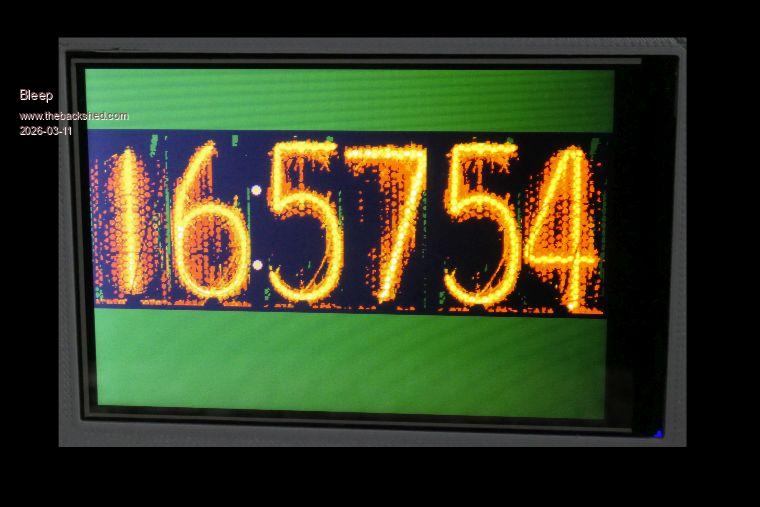
Hi, Here is my take on a Nixie Clock for a PicoMite, Both for a 480x320 LCD and a HDMI VGA, It might be ok on a standard VGA, I have not tried it, I have also not tested it on a 2040 Pico.
toml_12953 Guru Joined: 13/02/2015 Location: United StatesPosts: 733
Posted: 01:27am 11 Mar 2026
Copy link to clipboard
Print this post
In the jpg file, all the digits look fine but when the program runs, the 4 and the 9 don't display properly in the minutes column. Edited 2026-03-11 11:32 by toml_12953
ville56 Guru Joined: 08/06/2022 Location: AustriaPosts: 642
Posted: 07:47am 11 Mar 2026
Copy link to clipboard
Print this post
toml_12953,
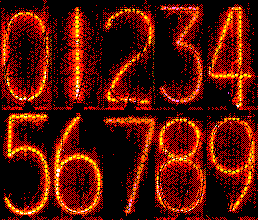
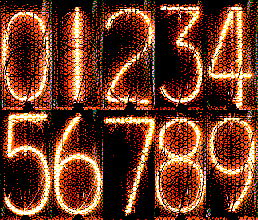
I've done some optimisation (brightness, contrast, color depth, size) on the fonts. I use the .bmp to load. All 3 fonts do work with BLIT commands (.bmp files) without a hitch. Difference is, that I'm loading the fonts onto 6 individual LCD displays and you use a single one. If I find time I will also try to setup a similar environment like yours and see if I can reproduce the issue.
N.B.; I'm still fiddling around with my software. Now try to get DCF77 working, but I'm here on the edge of the indoor receiving range (Vienna/Austria) and so I'm currently working on an "extension" via 433MHz ISM band. Edited 2026-03-11 17:48 by ville56 73 de OE1HGA, Gerald
Bleep Guru Joined: 09/01/2022 Location: United KingdomPosts: 863
Posted: 10:06am 11 Mar 2026
Copy link to clipboard
Print this post
Hi Toml When you say the 4 & 9 don't display properly, what exactly do you mean? What picomite are you using? You do realise this will only work on a HDMI VGA or a 480x320 LCD & not tested on a RP2040 which may not have enough memory.
Martin H. Guru Joined: 04/06/2022 Location: GermanyPosts: 1570
Posted: 11:40am 11 Mar 2026
Copy link to clipboard
Print this post
Hi Kevin Looks realy good on HDMI, but will not run on 2040 (no Mode 3) So you can lower the resolution to 320x240 (Mode 2) reduse your source to BW (mode 1) Good Job Cheers Martin'no comment
ville56 Guru Joined: 08/06/2022 Location: AustriaPosts: 642
Posted: 11:50am 11 Mar 2026
Copy link to clipboard
Print this post
RP2040 doesn't have HDMI at all ... do you mean VGA? 73 de OE1HGA, Gerald
Bleep Guru Joined: 09/01/2022 Location: United KingdomPosts: 863
Posted: 11:56am 11 Mar 2026
Copy link to clipboard
Print this post
Hi Martin, I can try re-sizing to fit 320x240, but I think the images will become too small, one option might be to only show Hours & Minutes. While you are here, on a LCD The JPGs are full colour, and I am placing the Jpg of the Nixie tubes on to a Framebuffer layer, but they are limited in colour range, do you know, if I put the JPG onto the normal screen temporarily, then copy each digit to BLIT buffers, assuming there is enough memory, which I think there is not, do the BLIT buffers have a higher colour count, ie same as the screen in use, or they similarly colour depth limited. Thanks. Kevin. Edited 2026-03-11 22:08 by Bleep
phil99 Guru Joined: 11/02/2018 Location: AustraliaPosts: 3412
Posted: 12:08pm 11 Mar 2026
Copy link to clipboard
Print this post
Yes, maintains all the colours.
Martin H. Guru Joined: 04/06/2022 Location: GermanyPosts: 1570
Posted: 12:57pm 11 Mar 2026
Copy link to clipboard
Print this post
Kevin I reduced the template by half, so it should fit in Mode 2. See which version you like better.
Cheers Martin Edited 2026-03-11 22:59 by Martin H.'no comment
Bleep Guru Joined: 09/01/2022 Location: United KingdomPosts: 863
Posted: 05:43pm 11 Mar 2026
Copy link to clipboard
Print this post
Hi Martin, I have already done this myself, but there seems to be a problem with Blit Framebuffer, in hight colour modes, or I'm not using it right, so I've escelated it. :-) Regards, Kevin.
Martin H. Guru Joined: 04/06/2022 Location: GermanyPosts: 1570
Posted: 06:35pm 11 Mar 2026
Copy link to clipboard
Print this post
This is mode 2 colours, i.e. RGB 121, no high colour Modes required. Meant for the 2040 Pico VGA. Blit Framebuffer works as intended. Edited 2026-03-12 04:36 by Martin H.'no comment
Bleep Guru Joined: 09/01/2022 Location: United KingdomPosts: 863
Posted: 10:17pm 11 Mar 2026
Copy link to clipboard
Print this post
Ok thanks Martin, I'll do a version using your bitmaps. Thanks, Kevin.
Bleep Guru Joined: 09/01/2022 Location: United KingdomPosts: 863
Posted: 07:01pm 12 Mar 2026
Copy link to clipboard
Print this post
Hi Martin, Attached is a new version of the VGA Mode 2 320x240 Nixie Clock, using your images, both sets are in the code, just change the commented out line. I couldn't use the PNG directly, not enough memory, so I changed them to BMP. I have included my 3 Nixie sets, as JPG, could you let me know how and what programs you use to reduce the colours to less than 16, and using the 121 colour set? also is it possible to reduce the brightness/contrast, so there are fewer random orange dots around/in the converted image? I only really use IrfanView and PhotoShop CS2, but if you recommend one I'm happy to install it. Regards, Kevin.
Martin H. Guru Joined: 04/06/2022 Location: GermanyPosts: 1570
Posted: 07:37pm 12 Mar 2026
Copy link to clipboard
Print this post
Hi Kevin, to draw, you can use whichever tool you feel most comfortable with. As I've mentioned a few times before, I use Paint.net To get the images exactly to RGB 121 for the Pico, I use a few tools 1/2 I wrote myself in MMBasic for Windows. Which one I use always depends on the source and what you want to use the image for.
BTW: the PicomiteVGA Nixie-Version(Mode 2) runs and looks fine Have Fun Cheers Martin Edited 2026-03-13 16:50 by Martin H.'no comment
Bleep Guru Joined: 09/01/2022 Location: United KingdomPosts: 863
Posted: 09:55am 13 Mar 2026
Copy link to clipboard
Print this post
Presumably that now means it will work on a standard 2040 VGA as the 16 colours are the same and it now use less ram. Edited 2026-03-13 19:56 by Bleep
Martin H. Guru Joined: 04/06/2022 Location: GermanyPosts: 1570
Posted: 10:51am 13 Mar 2026
Copy link to clipboard
Print this post
I just tried it, but unfortunately it doesn't work on the standard 2040 VGA...
[19] Blit Read 6,0,110,51,110 Error : Not enough Heap memory
You could work around this by,instead of storing the numbers in sprites, initializing the framebuffer first, load the Image there and then blitting the segments from the framebuffer F to N. BLIT FRAMEBUFFER from, to, xin, yin, xout, yout, width, height Edited 2026-03-14 01:14 by Martin H.'no comment

 Notice. New forum software under development. It's going to miss a few functions and look a bit ugly for a while, but I'm working on it full time now as the old forum was too unstable. Couple days, all good. If you notice any issues, please contact me.


 Print this post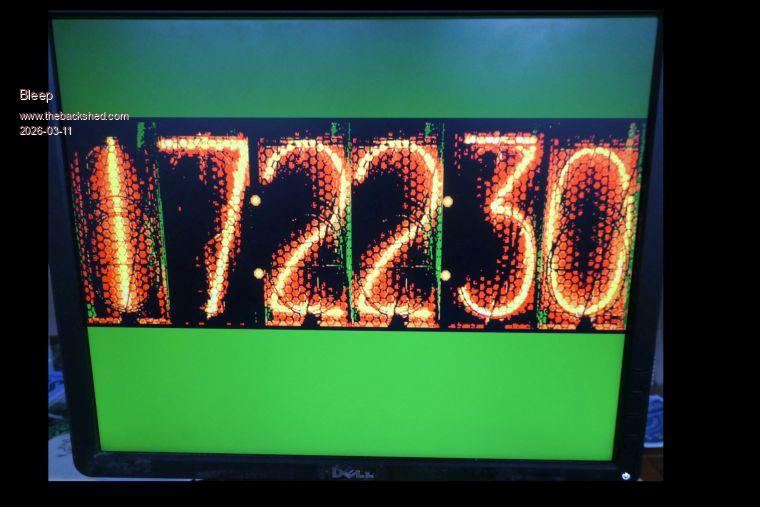

 but will not run on 2040 (no Mode 3)