Notice. New forum software under development. It's going to miss a few functions and look a bit ugly for a while, but I'm working on it full time now as the old forum was too unstable. Couple days, all good. If you notice any issues, please contact me.
lizby Guru Joined: 17/05/2016 Location: United StatesPosts: 3885
Posted: 11:52pm 14 Nov 2025
Copy link to clipboard
Print this post
Blessings to you and to all of your countrymen and women. May you continue to be a beacon to your well-wishers in the face of the barbarism of your neighbor who claims such an ancient kinship with you.
IanT Senior Member Joined: 29/11/2016 Location: United KingdomPosts: 137
Posted: 08:50am 15 Nov 2025
Copy link to clipboard
Print this post
Take good care of yourself Vadim and I hope this dreadful nightly onslaught ends soon.
Best Wishes,
IanT
twofingers Guru Joined: 02/06/2014 Location: GermanyPosts: 1782
Posted: 12:03pm 17 Nov 2025
Copy link to clipboard
Print this post
Hi Vadim, I'm glad to hear from you and that you're doing well. I couldn't have said it better than Lance (Lizby). Best wishes! Michael
javavi Guru Joined: 01/10/2023 Location: UkrainePosts: 620
Posted: 07:10pm 15 Feb 2026
Copy link to clipboard
Print this post
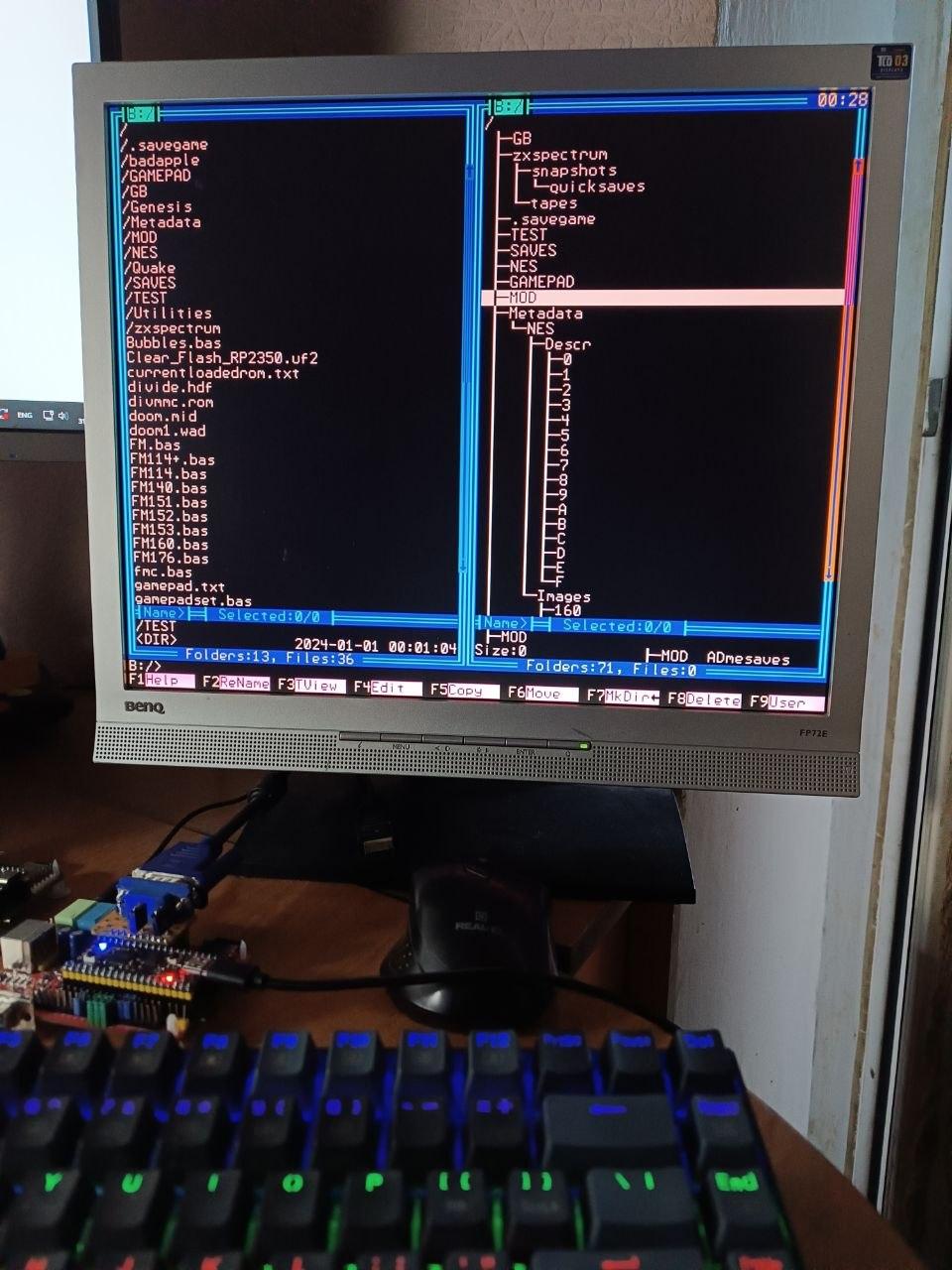
FM v1.76 for PicoMiteVGA/HDMI
A simple definition of file list lengths has been implemented based on the available heap memory in the system. For RP2040 -- 200 For RP2350 -- 256 For RP2350+PSRAM -- 1024
What's new? I've removed the Replace, Cutter, and Merge modules because they've become obsolete with the latest firmware version. There are improvements to popup handling (see the VGA-demo thread), the FindFile function, and the Jump to Letter function, as well as minor bug fixes. Overall, hardly noticeable to the user, but it was a significant overhaul.
Enjoy! I hope you're doing well! Michael
EDIT: Additional note: The player for MP3s, etc., works well, however, I occasionally experience serious crashes (firmware: v6.01, Heap: >100kB) when playing directories. These crashes even corrupt the code in memory and can only be resolved with a reset. I expect Peter has already fixed this problem in newer versions. Edited 2026-04-14 23:15 by twofingers
javavi Guru Joined: 01/10/2023 Location: UkrainePosts: 620
Posted: 08:17pm 16 Apr 2026
Copy link to clipboard
Print this post
Hi Michael & everyone here,
Apparently, our efforts with all the File Managers were not in vain, and we finally inspired Peter to take the plunge - to create a built-in FM.
I survived the winter with my family, to be honest, we almost died, but now everything is fine, it’s spring and things are already easier, but the enemy just won’t calm down, there are drone and missile attacks almost every day.
Good Luck, Have Fun, Don't Die!
Edited 2026-04-17 06:24 by javavi
TassyJim Guru Joined: 07/08/2011 Location: AustraliaPosts: 6625
Posted: 09:28pm 16 Apr 2026
Copy link to clipboard
Print this post
Hi Vadim, It is good to here from you. I think of you often, always hoping for the best and wishing the war would end (on your terms)
twofingers Guru Joined: 02/06/2014 Location: GermanyPosts: 1782
Posted: 10:18am 05 May 2026
Copy link to clipboard
Print this post
Hi Vadim, Jim said that nicely!
I've been tinkering with the File Manager a bit more.
Edit (Due to the significant changes, I have renamed the Input function in v02266 to "LEditx$()".): FMC02266.Music.zip
The following changes have been made:
1. The MP3 player now works perfectly (AFAIK). (Many thanks to Peter for the improved error handling!). This required reducing the maximum number of file items per panel to 350.
2. The user menu (F9) has been redesigned.
3. Drive selection for the C drive is ready. However, since some functions are still missing or faulty in version 6.0202b7, USB drive selection is not yet available.
4. The input routine has been completely redesigned and now allows the input of 254 characters across multiple lines with full cursor control. This prepares for path names with more than 63 characters in newer MMBasic versions. However, this has made the function slightly more complex.
5. A new file comparison function (Alt+F8) highlights files (or rather, their filenames) that already exist in the other panel or folder. (Experimental)
6. The new "Tree Info" function (Alt+F7) provides information about the number and size of files in a directory and its subdirectories. (Experimental)
7. The counting of selected file sizes is disabled when the number of selected files exceeds SMax (this can be set as desired). The number of selected files is then displayed as "-1".
8. Audio playback is paused with one click of ESC and stopped with two clicks in quick succession.
In addition, there are many minor bug fixes and improvements, as well as some general maintenance. Redundant code has been removed.
This version has been tested with PicoMite V 6.02.02B7.
Regards Michael Edited 2026-05-06 01:03 by twofingers
twofingers Guru Joined: 02/06/2014 Location: GermanyPosts: 1782
Posted: 11:20am 31 May 2026
Copy link to clipboard
Print this post
Hi Vadim.
The reason for this update is several new features:
1. There is now an input window for setting the time. 2. Previously, there was an issue where copied files would have the date of the copy operation, overwriting the original timestamp. This resulted in the loss of important information, such as for backups. This has been fixed. 4. The file compare function has been enhanced with the option to check the timestamp in addition to the filename. While this takes a little longer, it is more reliable than comparing filenames alone (optional). 5. User menu output is now also displayed on the serial console. 6. Basic functions such as Rename, Edit, Copy, Make Dir, and Delete have been adapted to the new maximum path length of 127 characters in version 6.03. This means that file and directory names can be a maximum of 63 characters long. I have tested this extensively, but without guarantee. However, the built-in safeguards do not prevent deliberate violations of the limits, e.g., if the directory name of a parent folder is subsequently extended. 6. TreeInfo has been expanded. 7. In addition, there are various bug fixes, optimizations, improvements, and streamlining.
I am considering re-integrating the Replace function into FileMaker, as the editor does not fully replace it.
The maximum number of files that can be displayed in a directory has been reduced to 260 items. This is due to the MP3 player, which requires approximately 83 KB of heap memory. Users can adjust this in the source code (RMax) – for example, if the MP3 player is not used. Older FileMaker versions have a maximum capacity of 400 items.
javavi Guru Joined: 01/10/2023 Location: UkrainePosts: 620
Posted: 05:19pm 31 May 2026
Copy link to clipboard
Print this post
Guten Tag Michael! I downloaded, installed, and briefly tested your new version of File Manager. It works well and is functional, and it looks great! I'm also happy to think that our efforts here inspired Peter to implement a built-in FM in the PicoMite firmware, but I think alternatives to this approach are also viable, expanding the capabilities and user experience. My thanks to you for your efforts in developing this File Manager feature.
Regards Vadim Edited 2026-06-01 03:51 by javavi
Volhout Guru Joined: 05/03/2018 Location: NetherlandsPosts: 6186
Posted: 07:22am 01 Jun 2026
Copy link to clipboard
Print this post
Hi Michael,
Your FMC Fiesta does run on RP2040-VGA, provided you remove the mode3 and map() functions. I did not manage to change drives on the left pane, but that may be due to me using MMCC as a terminal on linux (not the keyboard), and not having set the right <CR> or <LF> or both.
Maybe the memory restrictions (how many items) are also not matching the RP2040 memory map. Cannot test. Not enough files on my SD card.
One "artefact" I noticed is the circle while starting the FMC (scanning the drive I suppose) does not resolve completely. Initially a quarter is left as part of the planes.
Thank you for providing this "luxury" version of the FM. I default install 'miniFM3' as it also outputs nicely on console, but this would do nice for my VGA units.
twofingers Guru Joined: 02/06/2014 Location: GermanyPosts: 1782
Posted: 11:22am 04 Jun 2026
Copy link to clipboard
Print this post
Thank you both for the feedback.
@Vadim: I appreciate Peter's version for basic needs, but I view our FM as a more convenient version offering additional value.
@Harm, Unfortunately, I do not have a VGA hardware available for testing. Therefore, I can only offer versions for HDMI. Thanks for testing anyway!
I have further enhanced the copy function so that the copying of large files can now also be interrupted by pressing ESC. Regrettably, directories on drive A: are not assigned timestamps. This is somewhat annoying; I had hoped to be able to create perfect copies of all directories - for instance, prior to a firmware update - but unfortunately, this is only possible on drives B: and C:. At least for individual files, however, the preservation of timestamps works perfectly across all drives.
Regards Michael Edited 2026-06-07 19:07 by twofingers
twofingers Guru Joined: 02/06/2014 Location: GermanyPosts: 1782
Posted: 09:27am 20 Jun 2026
Copy link to clipboard
Print this post
Hi Vadim, This is the "Wings" version of the FM (HDMI/640x480):
version 02320 deleted
The text file viewer (F3) now has additional capabilities: 1. Line-by-line scrolling. 2. Toggle line number display (F2). 3. Jump to a specific line (Ins). 4. Search function (F3 and Shift+F3). The previous cut function has been removed because the editor handles that task better.
I prefer using the viewer for quick looks at text files because I don't have to worry about accidentally altering or damaging anything.
The "command line" now spans two lines to accommodate longer paths (up to 127 characters).
The three-line path display has also been visually updated to account for longer path lengths.
Additionally, safeguards have been implemented to prevent errors caused by excessively long paths.
The maximum number of files (including MP3 playback capability) is now 250 files per panel/folder.
A tip: I have set my baud rate to 460,800 (OPTION BAUDRATE 460800). It feels like everything runs much more smoothly.
Have fun! Michael
Update: I found another small bug: the search function in the text viewer only highlighted the first occurrence in a line. Update2: There was a bug in the new copy function in version 02322 that prevented the original file date from being preserved during copying. I don't think anyone has downloaded the FM yet anyway, so it probably doesn't matter. Update3: A small improvement for the text viewer: the displayed page is preserved when switching to line numbers. Update4: The search (F3) function remembers the last input. Update5: The only new feature in this version is a progress bar in the txtviewer. The search function in the txtviewer has been modified and revised; it now starts from the current position - meaning you have to scroll to the first page if you want to search the entire file. This allows for better control over what is being searched.
Update6: This is the newest test version of the FM-"Mutator". I originally just wanted to see if it was possible to implement a "replace" function in the viewer and get a feel for how it works. I am pleasantly surprised that it functions so well - much better than expected. In addition, the search function has been enhanced with RegEx support, and a bookmarking feature has been added. The downside is that the code has become very extensive and complex, and the maximum number of files per folder (RMax) has dropped to 240 (if music player functionality is to be supported). Backing up the original file _before_ performing any replacement is strongly recommended.

 Notice. New forum software under development. It's going to miss a few functions and look a bit ugly for a while, but I'm working on it full time now as the old forum was too unstable. Couple days, all good. If you notice any issues, please contact me.


 Print this post